> For the complete documentation index, see [llms.txt](https://docs.payfacto.com/centre-de-documentation-payfacto/llms.txt). Markdown versions of documentation pages are available by appending `.md` to page URLs; this page is available as [Markdown](https://docs.payfacto.com/centre-de-documentation-payfacto/maitred-pos/maitred/maitred-complete-online-documentation/chap-9-report-center/report/report-analysis/statistics.md).
# Statistics
Maitre'D's Statistics report shows you sales details, by Modes and by Revenue Centers, as well as for the whole restaurant's totals with statistics, on a last page. From the report filter window, select the appropriate date frame to be included in the report. The following is a sample of the Statistics report:
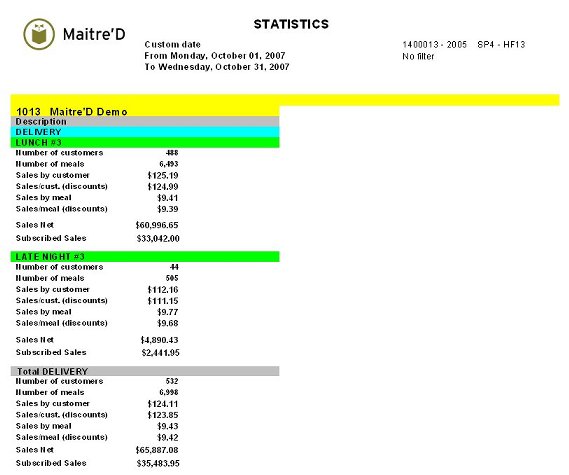 The report is divided in two parts. The first part, on a separate page for each Revenue Center, prints for all Modes and Revenue Centers:
**Number of Customers:**
Total customer served.
**Number of Meals:**
Total meals served.
**Sales by Customer:**
Average sales per customer before discounts.
**Sales/Cust. (discounts):**
Average sales per customer after discounts.
**Sales by Meal:**
Average sales per meal before discounts.
**Sales/Meal (discounts):**
Average sales per meal after discounts.
**Sales Net:**
Total sales after discounts.
**Subscribed Sales:**
Total sales of all divisions the restaurant has to pay royalties on.
The report is divided in two parts. The first part, on a separate page for each Revenue Center, prints for all Modes and Revenue Centers:
**Number of Customers:**
Total customer served.
**Number of Meals:**
Total meals served.
**Sales by Customer:**
Average sales per customer before discounts.
**Sales/Cust. (discounts):**
Average sales per customer after discounts.
**Sales by Meal:**
Average sales per meal before discounts.
**Sales/Meal (discounts):**
Average sales per meal after discounts.
**Sales Net:**
Total sales after discounts.
**Subscribed Sales:**
Total sales of all divisions the restaurant has to pay royalties on.
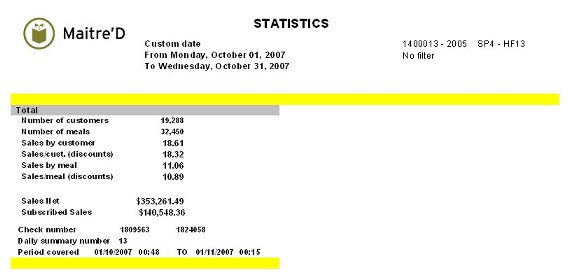 The second part, on a last page, prints the total for the whole restaurant, and adds the following information:
**Check Number:**
Beginning and ending bill numbers for that date frame.
**Daily Summary Number:**
Number of fiscal days from the opening of the restaurant to the last day covered by these statistics.
**Period Covered:**
Beginning and ending date and time included.
The second part, on a last page, prints the total for the whole restaurant, and adds the following information:
**Check Number:**
Beginning and ending bill numbers for that date frame.
**Daily Summary Number:**
Number of fiscal days from the opening of the restaurant to the last day covered by these statistics.
**Period Covered:**
Beginning and ending date and time included.