Loading...
Loading...
Loading...
Loading...
Loading...
Loading...
Loading...
Loading...
Network Requirements (Wired)
Network Requirements (Wi-Fi)
Network Layout
Operating System Requirements
Unsupported Operating Systems
Tablets
While using Wi-Fi is not mandatory in of itself, many modern devices can only connect to the Veloce POS system trough Wi-Fi. Those include Android or Apple tablets, as well as some payment terminals.
To ensure stability and security with the Veloce POS system, certain requirements must be met when using Wi-Fi.
Despite the claims of various manufacturers, an average Wi-Fi access point will efficiently cover approximately 2000 square feet, which corresponds to a floor measuring 40' x 50'. Many factors can affect coverage of access points, such as the thickness of walls, various obstacles like support columns, the presence of electrical equipment and wiring, as well as other communication devices which can create interference.
To estimate your needs in terms of Wireless Access Points, use the following rules:
Minimum one access point per floor.
Minimum one access point per outside space.
One access point per 2000 sq. ft. of floor space.
For example, if a restaurant has two floors and an outside patio, we already know that at least 3 access points will be required. (1 AP per floor and 1 AP per outside space)
Next, we need to account for the square footage:
3000 sq. ft. on the ground floor.
1000 sq. ft. on the second floor.
500 sq.ft. on an outside patio.
This means this restaurant would need a minimum of 4 access points:
2 access points to cover the ground floor, since that floor exceeds 2000 sq. ft.
1 access point to cover the second floor. (You need at least one access point per floor)
1 access point to cover the patio. (You need at least one access point per outside space)
Wi-Fi 5 supports up to 6933 Mbits/s. Avoid using client devices which support less than 100 Mbits/s Wi-Fi speed.
Minimum signal strength
55 to 60 dBm
Use signal measuring devices to make sure the signal is strong enough to cover the area where Wi-Fi devices will be is use.
SSID
Unique SSID for the POS system
The POS system needs to have its own SSID, which needs to be segregated from other services such as guest Wi-Fi access.
Encryption
WPA2 or better
Always use the latest and most secure encryption standard available, along with a strong passphrase.
Protocol
Wi-Fi 5 (802.11 ac) or better
Use recent access point hardware which supports the latest protocols. These devices are typically backwards-compatible with older clients (tablets phones, laptops, etc.)
Speed
100 Mbits/s or better
Veloce can be installed using different network models depending on the specific needs of any business.
For instance, the Veloce Back-Office software and the POS software can both be installed on the same device for smaller establishments. For larger operations, the Back-Office can be installed on a separate PC located in a communication closet while dozens of POS workstations are installed throughout the building.
Here are a few examples of common configurations:
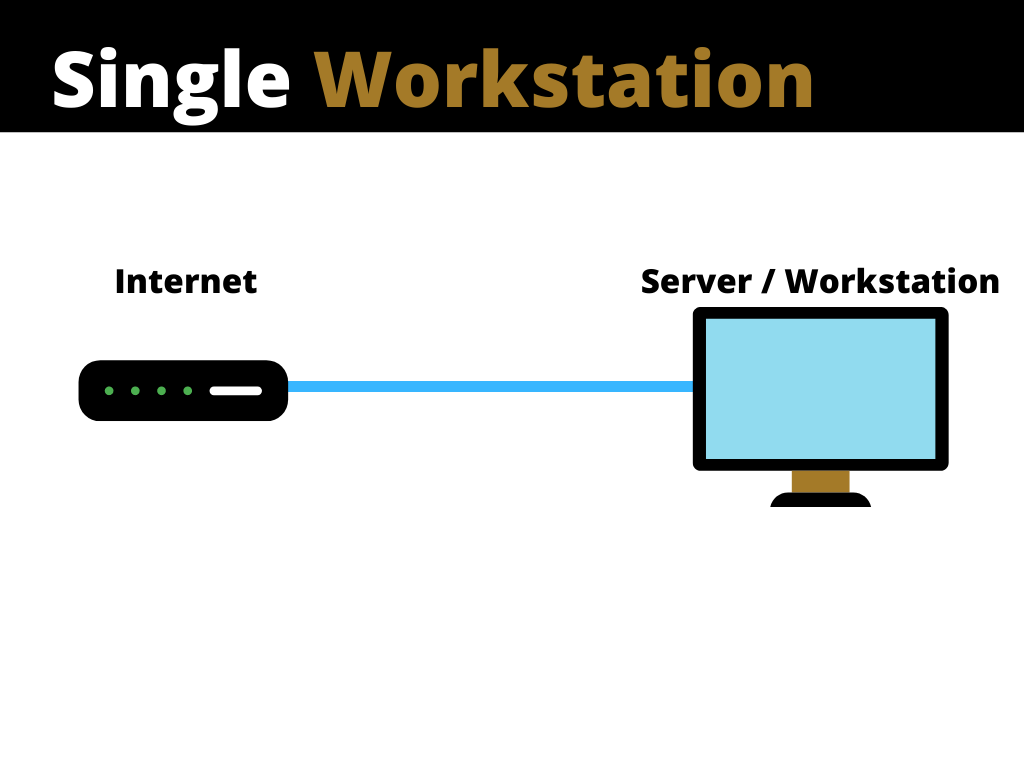
The workstation is generally connected to the Internet to benefit from online features, and nothing else is connected to it.
This is one of the most common layouts. This layout is very flexible, as it allows for additional workstations to be easily configured to follow an increase in the volume of operations.
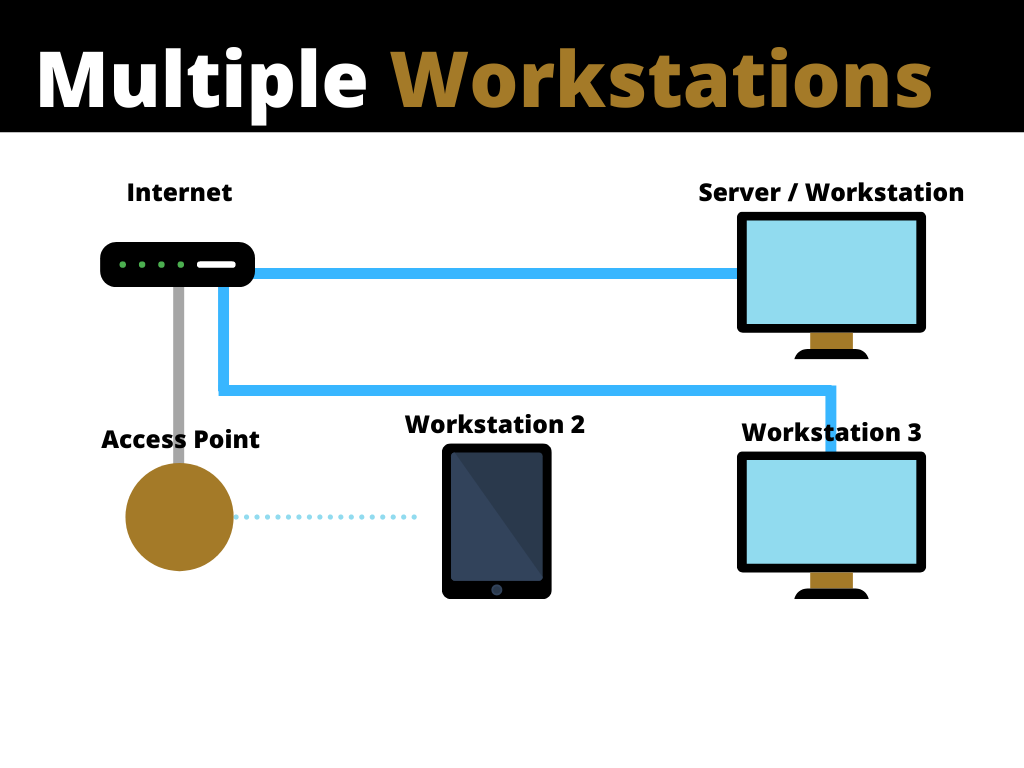
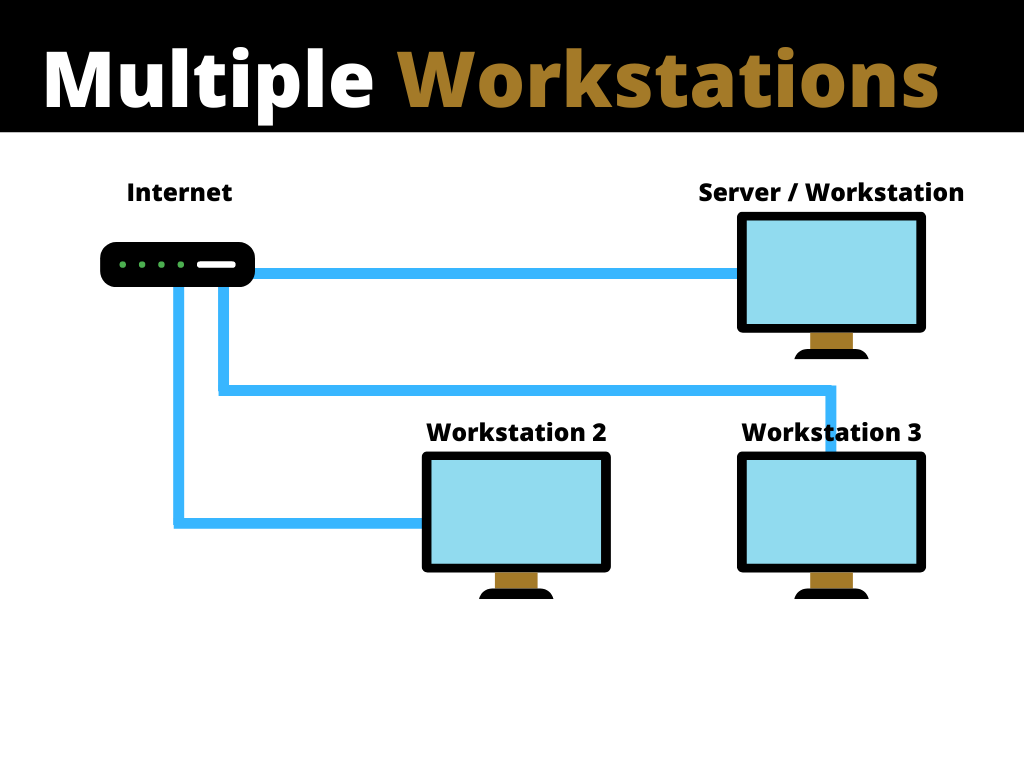
In this layout, one of the workstations is also used as the Veloce Back-Office server, which avoids the use of a dedicated PC for that purpose, saving space and lowering hardware costs.
The other workstations are connected to the Back-Office server through a TCP/IP network, which is itself connected to the Internet.
This network layout is very similar to the Multiple Workstations layout seen previously. Like its predecessor, it uses a Back-Office Server / Workstation combo and workstations are connected together with a TCP/IP network. On this one, however, a WiFi access point is added to provide connectivity to an Android or iOS tablet workstation. Note that for security reasons, this access point is dedicated to workstations only. WiFi Internet access for customers needs to be provided by a separate device or VLAN.
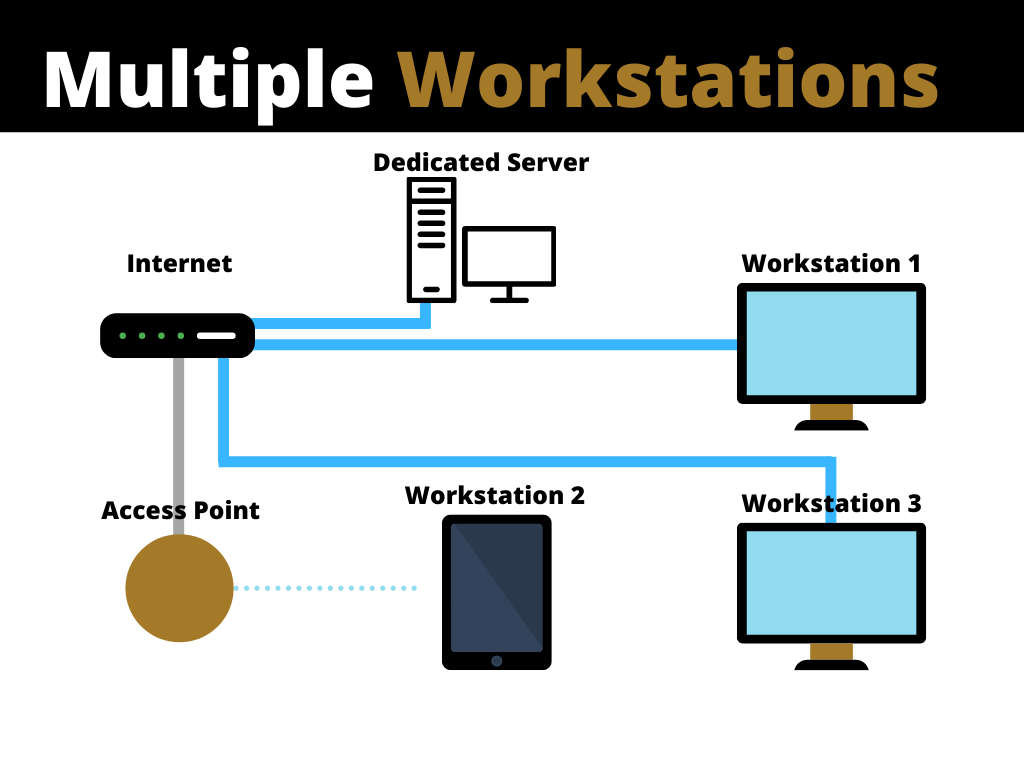
Again, this layout is very similar to the other two layouts with multiple workstations. The main difference here is the fact that a dedicated server is used instead of a Server / Workstation combo. The dedicated server can be a simple desktop PC installed in the manager's office or in a small communication closet. For large operations, a rackmount server in a server room can also be used for this purpose.
This layout is used when there is space available to accommodate the dedicated server and that the processing power provided by a Server / Workstation combo is insufficient to meet the needs of a larger operation with dozens of workstations.
This layout offers maximum flexibility. It is very easy to add more workstations as needed, and the performance loss incurred by adding more workstations is negligible.





Electronic tablets can be used as mobile POS devices for table-side ordering. They can also be used as "queue-busting" devices in fast-food environments. The Veloce POS application supports Windows, iOS and Android devices. Here are specific requirements for each type of tablet:
The following topic describes various requirements related to Internet access and local network connectivity required to operate your Veloce POS system and process payments with PayFacto efficiently.
Internet connectivity is required to validate the Veloce license, download and install updates and process payments. The requirements listed below are for normal Veloce operation and payment processing only. If the merchant uses internet access for other purposes, such as providing internet access to guests, additional bandwidth will need to be factored in to accommodate those needs.
Download
100 Mbit/s
>100 Mbit/s
Upload
10 Mbit/s
20 Mbit/s
The following devices each need to be connected to your local area network (LAN) via Ethernet adapters and cables:
Veloce Back-Office server
Veloce POS workstations
Kitchen Printers (some models)
Kitchen Monitors
Receipt Printers (some models)
Payment Terminals (some models)
Speed
100 Mbit/s
1 Gbit/s
Cable Type
Cat 5e
Cat 6
iOS version 9.0 or later
RAM
2 GB or more
Storage
32 GB or more
OS Version
Android version 5.0 (Lollipop) or later
RAM
2 GB or more
Storage
32 GB or more
OS Version
Windows 10 / 11
RAM
2 GB or more (4 GB recommended)
Storage
64 GB or more
OS Version
To facilitate reading and interpretation of hardware requirements, they are broken down in 3 tiers:
The minimum requirement is the bare minimum that will allow Veloce to operate adequately, without any consideration for possible expansion or "future-proofing".
The recommended hardware configuration should yield adequate performance in most situations and provide headroom for future expansion of the system.
The hardware configuration for large sites should yield adequate performance in restaurants using 20 or more POS workstations. This requirement also applies to restaurants with high volume of orders where the number of POS workstations may not be as high as 20, but where the POS Workstations are in near-constant use.
In some cases, Windows 11 may have more stringent hardware requirements than Veloce. If you wish to use your POS system with Windows 11, these requirements need to be accounted for:
Intel Core i7 8700 series
or better
RAM
8Gb
16Gb
32Gb
Storage (free space)
5Gb (installation)
+
10Gb (storage)
SATA SSD
5Gb (installation)
+
10Gb (storage)
NVMe SSD
5Gb (installation)
+
10Gb (storage)
Graphics
DirectX 9 compatible or later
DirectX 9 compatible or later
DirectX 9 compatible or later
Display
1280 x 1024
1920 x 1080
1920 x 1080
Network
100 Mbit/s
Gigabit
Gigabit or better
Pointing Device
Mouse or equivalent
Mouse or equivalent
Mouse or equivalent
Printer (optional)
Ink jet or laser,
US Letter or A4
Ink jet or laser,
US Letter or A4
Ink jet or laser,
US Letter or A4
CPU
Intel Celeron J1900
or better
Intel Celeron J4105
or better
Intel Core i3 2100 series
or better
RAM
4Gb
8Gb
8Gb
Storage (free space)
1Gb
1Gb
1Gb
Graphics
DirectX 11 compatible or later
DirectX 11 compatible or later
DirectX 11 compatible or later
Display
1024 x 768
1024 x 768
1024 x 768 or better
Network
100 Mbit/s
Gigabit
Gigabit or better
Pointing Device
Resistive touch screen
Projected Capacitive touch screen
Projected Capacitive touch screen
TPM
Trusted Platform Module (TPM) version 2.0.
Graphics Card
Compatible with DirectX 12 or later with WDDM 2.0 driver.
Display
High definition (720p) display that is greater than 9'' diagonally, 8 bits per color channel.
Hardware
Minimum
Recommended
Large sites
Operating System
CPU
Intel Core i3 8100 series
or equivalent
Hardware
Minimum
Recommended
High Volume
Operating System
CPU
1 Gigahertz (GHZ) or faster, with 2 or more cores on a compatible 64-bit processor or System on a Chip (SoC).
RAM
4 gigabyte (GB).
Storage
64 GB or larger.
System Firmware
Intel Core i5 8400 series
or better
UEFI, Secure Boot capable.
Once a Microsoft operating system (OS) reaches the end of support, customers will no longer receive security updates. The OS may still work with programs and hardware after the sale or support of the operating system has been discontinued. However, the possibility increases that new programs and hardware will not be performant on an older OS. This frequently occurs because the manufacturers of new hardware and software make product-design decisions that take advantage of the increased functionality and features in newer operating systems. These manufacturers may decide to discontinue support of their products on older operating systems as appropriate.
For Veloce, this means that the POS system will continue to work after the end of support. However, as updates and features are added to Veloce after EOL, the possibility increases that new Veloce releases become incompatible with older operating systems. Furthermore, deprecated operating systems represent a liability which may compromise the entire POS system's security.
For more information, please see:
Any system using an unsupported or deprecated operating system automatically falls out of PCI-DSS compliance due to the inability of such systems to meet PCI-DSS Requirement 6.2.
“Ensure that all system components and software are protected from known vulnerabilities by installing applicable vendor supplied security patches. Install critical security patches within one month of release.”
Some operating systems are not supported by PayFacto even though they are still supported by Microsoft. These can be divided in two categories:
Some operating systems never received wide market adoption, such that PayFacto never deemed necessary or profitable to perform any kind of testing on these products. While these operating systems may work with Veloce, PayFacto cannot provide any form of guarantee to that effect, as they were never tested. Such products include Microsoft Windows Vista (which is now also EOL) and Microsoft Windows 8 / 8.1.
Microsoft publishes a wide array of Windows editions targeted for home users, educational versions for schools and other specialized versions for niche users. These versions of windows are not supported due to the lack of certain key features, or because of the Microsoft End-User License Agreement (EULA), which may not cover commercial or industrial use cases.
UNSUPPORTED
December 31, 2004
Microsoft Windows 98
UNSUPPORTED
July 11, 2006
Microsoft Windows 98 SE
UNSUPPORTED
July 11, 2006
Microsoft Windows Millenium Edition
UNSUPPORTED
July 11, 2006
Microsoft Windows 2000
UNSUPPORTED
July 13, 2010
Microsoft Windows XP (ALL EDITIONS)
UNSUPPORTED
April 8, 2014
Windows Embedded for Point of Service (WEPOS) 1.x SP3
UNSUPPORTED
April 12, 2016
Microsoft Windows Vista (ALL EDITIONS)
UNSUPPORTED
April 11, 2017
Windows Embedded POS Ready 2009
UNSUPPORTED
April 9, 2019
Microsoft Windows 7 Starter
UNSUPPORTED
January 14, 2020
Microsoft Windows 7 Home Basic
UNSUPPORTED
January 14, 2020
Microsoft Windows 7 Home Premium
UNSUPPORTED
January 14, 2020
Microsoft Windows 7 Professional
UNSUPPORTED
January 14, 2020
Microsoft Windows 7 Enterprise
UNSUPPORTED
January 14, 2020
Microsoft Windows 7 Ultimate
UNSUPPORTED
January 14, 2020
Microsoft Windows POSReady 7
UNSUPPORTED
October 12, 2021
Microsoft Windows 8 (ALL EDITIONS)
UNSUPPORTED
January 10, 2023
Microsoft Windows 8.1 (ALL EDITIONS)
UNSUPPORTED
January 10, 2023
Microsoft Windows 8 Core
UNSUPPORTED
January 10, 2023
Microsoft Windows "RT"
UNSUPPORTED
January 10, 2023
Microsoft Windows 10 Home
UNSUPPORTED
October 14, 2025
Microsoft Windows 10 Education
UNSUPPORTED
October 14, 2025
Microsoft Windows 10 Pro Education
UNSUPPORTED
October 14, 2025
Microsoft Windows 10 IoT Core
UNSUPPORTED
October 14, 2025
Microsoft Windows 10 Mobile
UNSUPPORTED
October 14, 2025
Microsoft Windows 10 Mobile Enterprise
UNSUPPORTED
October 14, 2025
Microsoft Windows 10 Team
UNSUPPORTED
October 14, 2025
Microsoft Windows 10 "X"
UNSUPPORTED
October 14, 2025
Microsoft Windows 2000 Server
UNSUPPORTED
July 13, 2010
Microsoft Windows Server 2003
UNSUPPORTED
July 14, 2015
Microsoft Windows Server 2008
UNSUPPORTED
January 14, 2020
Microsoft Windows Server 2008 R2
UNSUPPORTED
January 14, 2020
Microsoft Windows 10, version 1507
UNSUPPORTED
May 9, 2017
Microsoft Windows 10, version 1511
UNSUPPORTED
October 10, 2017
Microsoft Windows 10, version 1607
UNSUPPORTED
April 9, 2019
Microsoft Windows 10, version 1703
UNSUPPORTED
October 8, 2019
Microsoft Windows 10, version 1709
UNSUPPORTED
April 14, 2020
Microsoft Windows 10, version 1803
UNSUPPORTED
November 10, 2020
Microsoft Windows 10, version 1809
UNSUPPORTED
November 10, 2020
Microsoft Windows 10, version 1903
UNSUPPORTED
December 8, 2020
Microsoft Windows 10, version 1909
UNSUPPORTED
May 11, 2021
Microsoft Windows 10, version 2004
UNSUPPORTED
December 14, 2021
Microsoft Windows 11 Home, version 21H2
UNSUPPORTED
October 10, 2023
Microsoft Windows 11 Education, version 21H2
UNSUPPORTED
October 8, 2024
Name
Support Status
(PayFacto)
End-of-Life
(Microsoft)
Microsoft Windows 95
UNSUPPORTED
December 31, 2001
Microsoft Windows NT
Veloce is designed for the Microsoft Windows environment and will operate on a 64-bit edition of Windows. This makes Veloce "hardware-agnostic", which means it will work on any hardware that can run Microsoft Windows, as long as it meets the minimum performance requirements of the operating system.
The table below lists all currently supported operating systems with their projected End-of-Life date issued by Microsoft.
IMPORTANT! Operating systems that have reached their End-of-Life are not listed here, as PayFacto cannot guarantee reliable operation with deprecated operating systems.
While some deprecated operating systems may still work with Veloce, they are no longer supported by Microsoft and therefore no longer receive security updates.
As such, deprecated operating systems represent a liability which may compromise the POS system's security.
In addition to the general End-of-Life date issued for Desktop operating systems, Microsoft also issues End-of-Life dates for specific patch levels. This is done by Microsoft to ensure that users keep their operating systems up-to-date.
While a POS, Backup Server or Auxiliary Back-Office would work perfectly on a server-oriented operating system, PayFacto does not recommend doing so, unless your operations specifically require this.
* Microsoft lists this date as the end of "Mainstream support" for this Windows version. Mainstream support is typically followed by an extended support period, however it is not listed on the Microsoft Lifecycle site for the time being.
Microsoft Windows 11 is the latest release of the Windows family of operating systems. It was released on October 5th, 2021. A full test suite has been run on PayFacto's POS products to ensure compatibility.
At this time, Microsoft has not issued official end-of-life (EOL) dates for the Windows 11 family of products. The only EOL dates available so far are for patch levels. These dates will be updated when Microsoft releases new feature updates for Windows 11.
Microsoft Windows 10 Pro
YES
YES
YES
Supported
October 14, 2025
Microsoft Windows 10 Pro for Workstations
YES
YES
YES
Supported
October 14, 2025
Microsoft Windows 11 Pro
YES
YES
YES
Supported
N/A
Microsoft Windows 11 Pro for Workstations
YES
YES
YES
Supported
N/A
Supported
October 10, 2024
Microsoft Windows 11 (Pro & Pro for Workstations), version 23H2
Supported
November 10,2026
Microsoft Windows 11 (Pro & Pro for Workstations), version 22H2
Supported
October 14, 2025
Microsoft Windows Server 2016
YES
NO*
NO*
Supported
January 11, 2027
Microsoft Windows Server 2019
YES
NO*
NO*
Supported
January 9, 2029
Microsoft Windows Server 2022
YES
NO*
NO*
Supported
October 14, 2031
Microsoft Windows 10 IoT Enterprise LTSB 2015
YES
YES
YES
Supported
October 13, 2025
Microsoft Windows 10 IoT Enterprise LTSB 2016
YES
YES
YES
Supported
October 12, 2026
Microsoft Windows 10 IoT Enterprise LTSC 2019
YES
YES
YES
Supported
January 8, 2029
Microsoft Windows 10 IoT Enterprise LTSC 2021
YES
YES
YES
Supported
January 12, 2032
Microsoft Windows 11 IoT Enterprise, version 21H2
YES
YES
YES
Supported
October 8, 2024
Microsoft Windows 10 Enterprise LTSB 2015
YES
YES
YES
Supported
October 13, 2025
Microsoft Windows 10 Enterprise LTSB 2016
YES
YES
YES
Supported
October 12, 2026
Microsoft Windows 10 Enterprise LTSC 2019
YES
YES
YES
Supported
January 8, 2029
Microsoft Windows 10 Enterprise LTSC 2021
YES
YES
YES
Supported
January 12, 2027*
Microsoft Windows 11 Enterprise, version 21H2
YES
YES
YES
Supported
October 8, 2024
Name
Suitable for:
Support Status
(PayFacto)
End-of-Life
(Microsoft)
Back-Office
POS
Backup / Auxiliary
Name
Support Status
(PayFacto)
End-of-Life
(Microsoft)
Microsoft Windows 10 (Pro & Pro for Workstations), version 22H2
Supported
October 14, 2025
Name
Suitable for:
Support Status
(PayFacto)
End-of-Life
(Microsoft)
Back-Office
POS
Backup / Auxiliary
Name
Suitable for:
Support Status
(PayFacto)
End-of-Life
(Microsoft)
Back-Office
POS
Backup / Auxiliary
Name
Suitable for:
Support Status
(PayFacto)
End-of-Life
(Microsoft)
Back-Office
POS
Backup / Auxiliary
Microsoft Windows 11 (Pro & Pro for Workstations), version 21H2