# Troubleshooting
## Troubleshooting
### Microsoft .NET Framework 3.5 is missing
#### Issue Description:
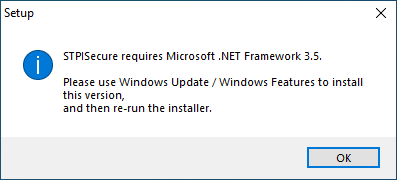
While attempting to install STPISecure, an error message is displayed:
STPISecure requires Microsoft .NET Framework 3.5.
Please use Windows Update / Windows Features to install this version, and then re-run the installer.
#### Solution:
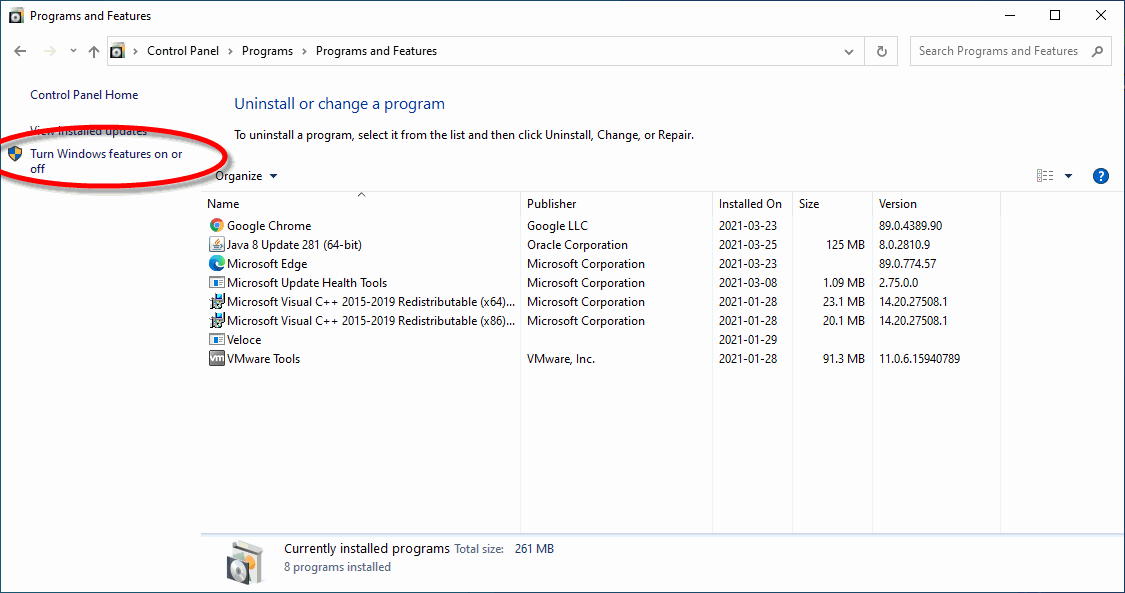
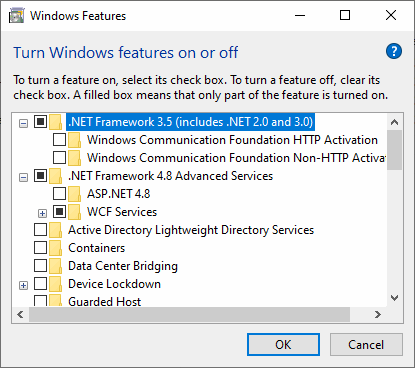
Install Microsoft .NET Framework 3.5 through Windows Update or use the "Turn Windows features on or off" option from Add/Remove programs to enable .NET Framework 3.5.
Once Microsoft .NET Framework 3.5 is installed, retry installing STPISecure.
***
### Java is missing
#### Issue Description:
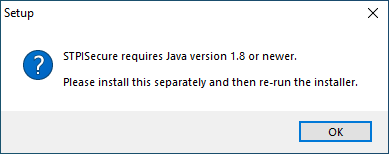
While attempting to install STPISecure, an error message is displayed:
STPISecure requires Java version 1.8 or newer.
Please install this separately and then re-run the installer.
#### Solution:
Download and install Java from the Oracle website:
Once Java is installed on your system, retry installing STPISecure.
---
# Agent Instructions: Querying This Documentation
If you need additional information that is not directly available in this page, you can query the documentation dynamically by asking a question.
Perform an HTTP GET request on the current page URL with the `ask` query parameter:
```
GET https://docs.payfacto.com/payfacto-knowledge/uk-and-intl/applications/securepay/troubleshooting.md?ask=
```
The question should be specific, self-contained, and written in natural language.
The response will contain a direct answer to the question and relevant excerpts and sources from the documentation.
Use this mechanism when the answer is not explicitly present in the current page, you need clarification or additional context, or you want to retrieve related documentation sections.