> For the complete documentation index, see [llms.txt](https://docs.payfacto.com/payfacto-knowledge/llms.txt). Markdown versions of documentation pages are available by appending `.md` to page URLs; this page is available as [Markdown](https://docs.payfacto.com/payfacto-knowledge/maitred-pos/maitred/maitred-online-help-contents-by-module/main-back-office/main-back-office-overview.md).
# Main Back-Office Overview
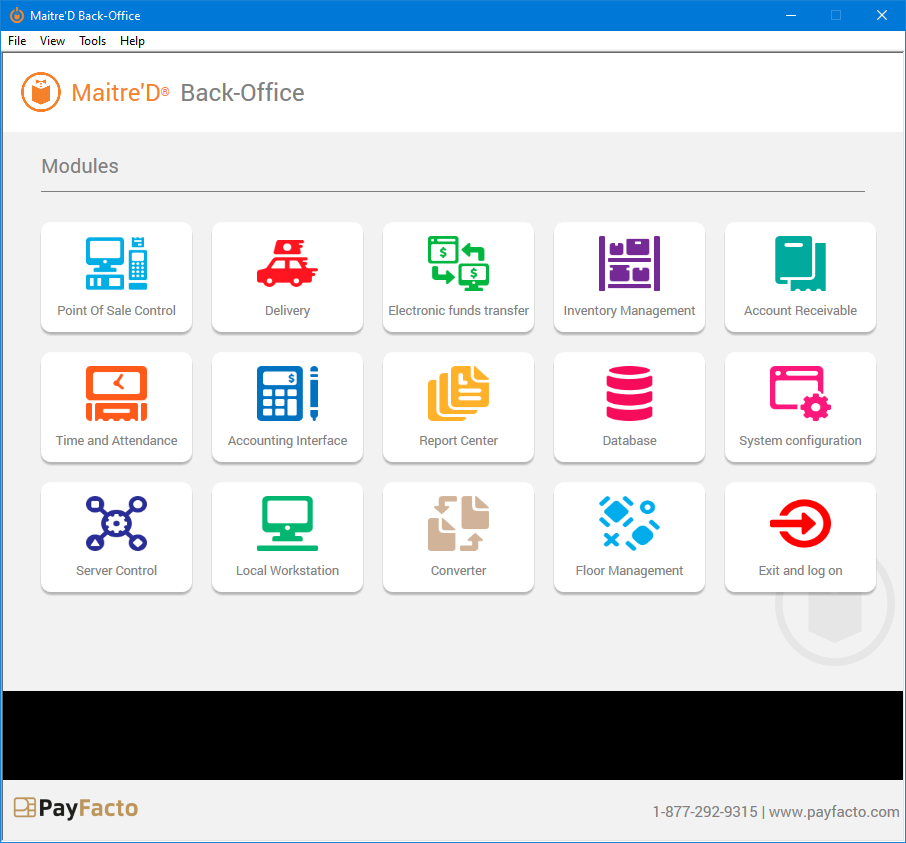
The Main Back-Office desktop is the starting point for all tasks that can be carried out at the Maitre'D Back-Office PC. It gives you access to all the Maitre'D modules as well as tools to manage you license options and Back-Office users.
{% hint style="info" %}
NOTE: The screenshot above displays all available modules. Modules that are not included with your license will not be displayed, so your own Maitre'D Back-Office desktop may look slightly different
{% endhint %}
***
### Maitre'D Back-Office Modules
Below is a short description of every module and option that can appear on the Maitre'D Main Back-Office Desktop. For more information on a specific module, please consult the documentation specific to that module.
Point of Sale Control
The Point of Sale (POS) Control module is a core Maitre'D module that is included with every license. It allows restaurants to manage their day-to-day operations from one central location. This is where employee access to the POS workstations is managed and where sales items are created.
### Delivery
Delivery is an optional module that can be purchased separately. It allows restaurants to configure the delivery system, including creating, modifying and deleting customers and street code records.
### Electronic Funds Transfer
Electronic Funds Transfer is an optional module that allows Maitre'D to interface with various payment solution providers to process credit and debit card payments.
### Inventory Management
Inventory Management is an optional module that allows restaurants to keep track of all the stock trough recipes linking ingredients to sales items.
Account Receivable
Account Receivable is an optional module that allows restaurants to manage their customer's accounts. Customers can charge meals to their account and restaurants can send statements to their customers.
Time and Attendance
Time and Attendance is an optional module that allows restaurants to manage employee's schedules, tasks, pay rates, punch-in, punch-out and break times.
### Accounting Interface
The Accounting Interface is an optional module that allows Maitre'D to interface with third-party accounting software such as Quickbooks and ACCPAC.
### Report Center
The report Center is a core Maitre'D module that is included with every license. It allows restaurants to generate reports for all aspects of their business.
### Database
Database is a core Maitre'D module that is included with every license. It is mainly used by trained Maitre'D specialists to troubleshoot issues or repair corrupt data.
System Configuration
System Configuration is a core Maitre'D module that is included with every license. It is used to configure general restaurant data such as postal and shipping addresses, and also to configure localization data such as currency symbols, date and time formats, etc. This module is also used to manage backups of the Maitre'D settings and contains advanced configuration options to modify all the prompts contained in the Maitre'D system.
### Server Control
Server Control is a core Maitre'D module that is included with every license. As its name implies, this module contains all the options to manage the Maitre'D Back-Office Server, like starting and stopping the server, performing end-of-days, etc. This module also includes many optional interfaces such as the hotel Interface, gift certificate interface, discount manager, etc.
### Local Workstation
The Local Workstation icon appears when the Local Workstation option is enabled within the Server Control module. This option allows the main Back-Office PC to be used as a POS workstation.
### Converter
Converter is an optional module that is included with E-Global and DataBoard solutions. It allows the conversion of data files from sales, management, payroll and inventory in industry-standard database format for consumption by E-Global Corporate Communication Module (CCM), DataBoard, or other third-party solution. It also manages incoming data from E-Global.
### Floor Management
Floor Management is an optional module that allows restaurants to manage their floor plans, create sections and view the floor plan with a graphical representation.
### Exit and log on
The Exit and log on icon is used to quickly close all open Maitre'D Back-Office modules and display the login prompt.
---
# Agent Instructions
This documentation is published with GitBook. GitBook is the documentation platform designed so that both humans and AI agents can read, navigate, and reason over technical content effectively. Learn more at gitbook.com.
## Querying This Documentation
If you need additional information that is not directly available in this page, you can query the documentation dynamically by asking a question.
Perform an HTTP GET request on the current page URL with the `ask` query parameter, and the optional `goal` query parameter:
```
GET https://docs.payfacto.com/payfacto-knowledge/maitred-pos/maitred/maitred-online-help-contents-by-module/main-back-office/main-back-office-overview.md?ask=&goal=
```
`ask` is the immediate question: it should be specific, self-contained, and written in natural language.
`goal` is optional and describes the broader end goal you are ultimately trying to accomplish on behalf of the user. GitBook uses it to tailor the answer towards what is most useful for that goal.
The response will contain a direct answer to the question and relevant excerpts and sources from the documentation.
Use this mechanism when the answer is not explicitly present in the current page, you need clarification or additional context, or you want to retrieve related documentation sections.


